


本人在建站过程中,看到其他博客中各种各样好看的栏目页面,想要借鉴到自己的博客里,却拼尽全力无法使用Wordpress默认编辑器实现,也没有找到相关教程。不论是添加csss还是嵌入html都无法实现与主题一致的效果,十分违和。尝试过使用Elementor,但升级版需要付费,且操作界面过于繁杂不方便入门,学习成本高,于是从源码出发,尝试修改主题文件达到目的。在阅读主题文件夹下的源码后,发现 “archive.php”、"index.php" 中包含了有关展示文章和说说的代码。
源码学习
其中 "index.php" 为主页,包含封面大图、Display和Article部分的代码。该文件通过引用 "tpl/content-thumb.php" 获取数据库中存储的静态页面、非静态文章和说说并按时间倒序排序,再通过引用 "tpl/content-thumbcard.php" 来将每篇文章以预设的样式展示。
“archive.php” 中包含相似的结构,获取某一特定分类下的所有文章和说说,并引用 "tpl/content-thumbcard.php" 来实现指定样式展示。如:二次元~ 标签。
综上所述,如果想要实现与主题一致的展示效果,必须在获取文章数据后通过引用模板 "tpl/content-thumbcard.php" 实现。
代码实现
首先在主题路径下创建一个存储自定义模板文件的php文件,我选择放在 "Sakurairo/" 文件夹中并命名为 "page-column-ai-cover.php" ,内容如下(其中包含其他可选参数及其使用方式):
<?php
/**
 * Template Name: 条件检索页面模板
 */
/**
 * The template for displaying archive pages.
 * @link https://codex.wordpress.org/Template_Hierarchy
 * @package Sakurairo
 */

get_header(); ?>

<div id="primary" class="content-area">
    <main id="main" class="site-main" role="main">
        <?php
        // 显示页面本身的内容,即 WordPress 页面编辑器中的内容
        if (have_posts()) :
            while (have_posts()) : the_post(); ?>
                <article id="post-<?php the_ID(); ?>" <?php post_class(); ?>>
       <!-- 以下注释部分会在使用了模板的页面中出现重复的标题,若有需求可以保留 -->
              <!--  <header class="entry-header">
                        <?php the_title('<h1 class="entry-title">', '</h1>'); ?>
                    </header>  -->

                    <div class="entry-content">
                        <?php the_content(); ?>
                    </div>
                </article>
            <?php endwhile;
        endif;

        // 显示特定分类的文章列表
        $args = array(
            'post_type' => array('post', 'shuoshuo'),
            'cat' => 11,
            'posts_per_page' => -1  // -1表示获取所有匹配的文章
        );
        $ai_query = new WP_Query($args);

        if ($ai_query->have_posts()) :
            while ($ai_query->have_posts()) : $ai_query->the_post();
                get_template_part('tpl/content', 'thumbcard');
            endwhile;
            // 重置查询
            wp_reset_postdata();
        else :
            get_template_part('tpl/content', 'none');
        endif;
        ?>

    </main><!-- #main -->
</div><!-- #primary -->

<?php
get_footer();此时,在添加页面界面中,可以选择模板:“条件检索页面模板”,即可在页面的内容后显示所有的分类ID为11的文章,且使用主题的默认样式。
但是该方案具有明显的局限性,即每有一个条件检索的需求,则需要额外复制一个相同的模板,且仅仅修改其中的查询条件。因此为提高代码复用性,可以利用 WordPress 的短代码功能优化其表现。
短代码优化
由于添加短代码需要修改主题文件 function.php ,更新主题时可能带来不便,而且 function.php 文件中函数太多不方便管理,因此选择插件 “Code Snippets” 、 “Simple Custom CSS and JS” 作为替代方案。 “Code Snippets” 支持添加 function.php 和 HTML ,虽然其原生支持 CSS 和 JS,但需要付费,用 “Simple Custom CSS and JS” 替补。
首先修改上述模板 "page-column-ai-cover.php" :
<?php
/**
 * Template Name: 条件检索页面模板
 */
/**
 * 通用AI内容页面模板,可通过短代码[ai_songs]控制显示内容
 * @link https://codex.wordpress.org/Template_Hierarchy
 * @package Sakurairo
 */

get_header(); ?>

<div id="primary" class="content-area">
    <main id="main" class="site-main" role="main">
        <?php
        // 显示页面本身的内容
        if (have_posts()) :
            while (have_posts()) : the_post(); ?>
                <article id="post-<?php the_ID(); ?>" <?php post_class(); ?>>

                    <div class="entry-content">
                        <?php the_content(); ?>
                    </div>
                </article>
            <?php endwhile;
        endif;
        ?>

    </main><!-- #main -->
</div><!-- #primary -->
<?php
get_footer();
简化模板内容,使其显示页面自身的内容即可,剩余操作交给短代码处理。
在 “Code Snippets” 插件中创建一个名为 “条件检索列表短代码” 的php文件(建议命名简单易懂,方便后续修改),其中添加以下代码:
/**
 * 条件检索列表短代码
 * 支持多种查询条件:分类ID、分类名、标签ID、标签名、文章ID等
 *
 * @param array $atts 短代码参数
 * @return string 输出的HTML内容
 */
function content_shortcode($atts) {
    // 默认参数
    $defaults = array(
        'post_types' => 'post,shuoshuo', // 文章类型,逗号分隔
        'posts_per_page' => '-1',        // 每页文章数,-1表示全部
        'orderby' => 'date',             // 排序字段
        'order' => 'DESC',               // 排序方式
        'template' => 'thumbcard',       // 使用的模板部分

        // 分类查询参数
        'category_id' => '',             // 分类ID
        'category_name' => '',           // 分类别名
        'category__in' => '',            // 多个分类ID,逗号分隔
        'category__not_in' => '',        // 排除的分类ID,逗号分隔

        // 标签查询参数
        'tag_id' => '',                  // 标签ID
        'tag_name' => '',                // 标签别名
        'tag__in' => '',                 // 多个标签ID,逗号分隔
        'tag__not_in' => '',             // 排除的标签ID,逗号分隔

        // 文章ID查询
        'post_ids' => '',                // 特定文章ID,逗号分隔
        'post__not_in' => '',            // 排除的文章ID,逗号分隔

        // 自定义分类法查询
        'taxonomy' => '',                // 自定义分类法名称
        'term' => '',                    // 自定义分类法的term(别名)
        'term_id' => '',                 // 自定义分类法的term ID
        'taxonomy_relation' => 'AND',    // 分类法查询关系:AND 或 OR
    );

    // 合并用户参数和默认参数
    $atts = shortcode_atts($defaults, $atts);

    // 验证taxonomy_relation参数
    $atts['taxonomy_relation'] = strtoupper($atts['taxonomy_relation']);
    if ($atts['taxonomy_relation'] !== 'AND' && $atts['taxonomy_relation'] !== 'OR') {
        $atts['taxonomy_relation'] = 'AND';
    }

    // 构建查询参数
    $args = array(
        'posts_per_page' => $atts['posts_per_page'],
        'orderby' => $atts['orderby'],
        'order' => $atts['order']
    );

    // 处理post_types参数
    if (!empty($atts['post_types'])) {
        $post_types = explode(',', $atts['post_types']);
        $post_types = array_map('trim', $post_types);
        // 验证post types是否存在
        $valid_post_types = array();
        foreach ($post_types as $post_type) {
            if (post_type_exists($post_type)) {
                $valid_post_types[] = $post_type;
            }
        }
        if (!empty($valid_post_types)) {
            $args['post_type'] = $valid_post_types;
        }
    }

    // 初始化tax_query
    $tax_query = array();

    // 处理分类查询
    if (!empty($atts['category_id']) || !empty($atts['category_name']) ||
        !empty($atts['category__in'])) {

        $category_query = array(
            'taxonomy' => 'category',
            'operator' => 'IN'
        );

        if (!empty($atts['category_id'])) {
            $category_query['terms'] = array($atts['category_id']);
            $category_query['field'] = 'term_id';
        } else if (!empty($atts['category_name'])) {
            $category_query['terms'] = array($atts['category_name']);
            $category_query['field'] = 'slug';
        } else if (!empty($atts['category__in'])) {
            $category__in = explode(',', $atts['category__in']);
            $category__in = array_map('trim', $category__in);
            $category__in = array_map('intval', $category__in);
            $category_query['terms'] = $category__in;
            $category_query['field'] = 'term_id';
        }

        $tax_query[] = $category_query;
    }

    // 处理分类排除
    if (!empty($atts['category__not_in'])) {
        $category__not_in = explode(',', $atts['category__not_in']);
        $category__not_in = array_map('trim', $category__not_in);
        $category__not_in = array_map('intval', $category__not_in);

        $tax_query[] = array(
            'taxonomy' => 'category',
            'field' => 'term_id',
            'terms' => $category__not_in,
            'operator' => 'NOT IN'
        );
    }

    // 处理标签查询
    if (!empty($atts['tag_id']) || !empty($atts['tag_name']) ||
        !empty($atts['tag__in'])) {

        $tag_query = array(
            'taxonomy' => 'post_tag',
            'operator' => 'IN'
        );

        if (!empty($atts['tag_id'])) {
            $tag_query['terms'] = array($atts['tag_id']);
            $tag_query['field'] = 'term_id';
        } else if (!empty($atts['tag_name'])) {
            $tag_query['terms'] = array($atts['tag_name']);
            $tag_query['field'] = 'slug';
        } else if (!empty($atts['tag__in'])) {
            $tag__in = explode(',', $atts['tag__in']);
            $tag__in = array_map('trim', $tag__in);
            $tag__in = array_map('intval', $tag__in);
            $tag_query['terms'] = $tag__in;
            $tag_query['field'] = 'term_id';
        }

        $tax_query[] = $tag_query;
    }

    // 处理标签排除
    if (!empty($atts['tag__not_in'])) {
        $tag__not_in = explode(',', $atts['tag__not_in']);
        $tag__not_in = array_map('trim', $tag__not_in);
        $tag__not_in = array_map('intval', $tag__not_in);

        $tax_query[] = array(
            'taxonomy' => 'post_tag',
            'field' => 'term_id',
            'terms' => $tag__not_in,
            'operator' => 'NOT IN'
        );
    }

    // 处理自定义分类法查询
    if (!empty($atts['taxonomy']) && (!empty($atts['term']) || !empty($atts['term_id']))) {
        // 验证自定义分类法是否存在
        if (taxonomy_exists($atts['taxonomy'])) {
            $custom_taxonomy_query = array(
                'taxonomy' => $atts['taxonomy'],
                'operator' => 'IN'
            );

            if (!empty($atts['term'])) {
                $custom_taxonomy_query['terms'] = array($atts['term']);
                $custom_taxonomy_query['field'] = 'slug';
            } else if (!empty($atts['term_id'])) {
                $custom_taxonomy_query['terms'] = array($atts['term_id']);
                $custom_taxonomy_query['field'] = 'term_id';
            }

            $tax_query[] = $custom_taxonomy_query;
        }
    }

    // 如果有多个tax_query条件,设置关系
    if (count($tax_query) > 1) {
        $tax_query['relation'] = $atts['taxonomy_relation'];
    }

    // 将tax_query添加到主查询参数
    if (!empty($tax_query)) {
        $args['tax_query'] = $tax_query;
    }

    // 处理文章ID查询
    if (!empty($atts['post_ids'])) {
        $post_ids = explode(',', $atts['post_ids']);
        $post_ids = array_map('trim', $post_ids);
        $post_ids = array_map('intval', $post_ids);

        // 过滤有效的文章ID
        $valid_post_ids = array();
        foreach ($post_ids as $post_id) {
            if (get_post_status($post_id)) {
                $valid_post_ids[] = $post_id;
            }
        }

        if (!empty($valid_post_ids)) {
            $args['post__in'] = $valid_post_ids;
            // 当指定多个文章ID时,按指定顺序排序
            if (count($valid_post_ids) > 1) {
                $args['orderby'] = 'post__in';
            }
        }
    }

    // 处理排除的文章ID
    if (!empty($atts['post__not_in'])) {
        $post__not_in = explode(',', $atts['post__not_in']);
        $post__not_in = array_map('trim', $post__not_in);
        $post__not_in = array_map('intval', $post__not_in);

        // 过滤有效的文章ID
        $valid_post__not_in = array();
        foreach ($post__not_in as $post_id) {
            if (get_post_status($post_id)) {
                $valid_post__not_in[] = $post_id;
            }
        }

        if (!empty($valid_post__not_in)) {
            $args['post__not_in'] = $valid_post__not_in;
        }
    }

    // 添加分页支持
    $paged = (get_query_var('paged')) ? get_query_var('paged') : ((get_query_var('page')) ? get_query_var('page') : 1);
    $args['paged'] = $paged;

    // 执行查询
    $ai_query = new WP_Query($args);
    $output = '';

    if ($ai_query->have_posts()) {
        ob_start(); // 开始输出缓冲

        while ($ai_query->have_posts()) : $ai_query->the_post();
            // 动态获取模板部分,支持传入的template参数
            get_template_part('tpl/content', $atts['template']);
        endwhile;

		        // 添加分页导航 - 与原始归档模板保持一致
        if (iro_opt('pagenav_style') == 'ajax') { ?>
            <div id="pagination" class="pagination-archive">
                <?php echo next_posts_link(__(' Previous', 'sakurairo'), $ai_query->max_num_pages); ?>
            </div>
            <div id="add_post"><span id="add_post_time" style="visibility: hidden;" title="<?php echo iro_opt('page_auto_load', ''); ?>"></span></div>
        <?php } else { ?>
            <nav class="navigator">
                <?php previous_posts_link('<i class="fa-solid fa-angle-left"></i>', $ai_query->max_num_pages); ?>
                <?php next_posts_link('<i class="fa-solid fa-angle-right"></i>', $ai_query->max_num_pages); ?>
            </nav>
        <?php }

        // 重置查询
        wp_reset_postdata();

        $output = ob_get_clean(); // 获取缓冲内容
    } else {
        ob_start();
        get_template_part('tpl/content', 'none');
        $output = ob_get_clean();
    }

    return $output;
}
add_shortcode('content', 'content_shortcode');
现在,页面编辑的任何地方添加简码,即可根据简码内容显示指定的文章和说说。所有短代码可选标签均在文件开头,按需填写即可。
使用示例
# 选择所有分类id为11的文章和说说
[content category_id="11"]

# 选择所有标签id为12的文章和说说
[content tag_id="12"]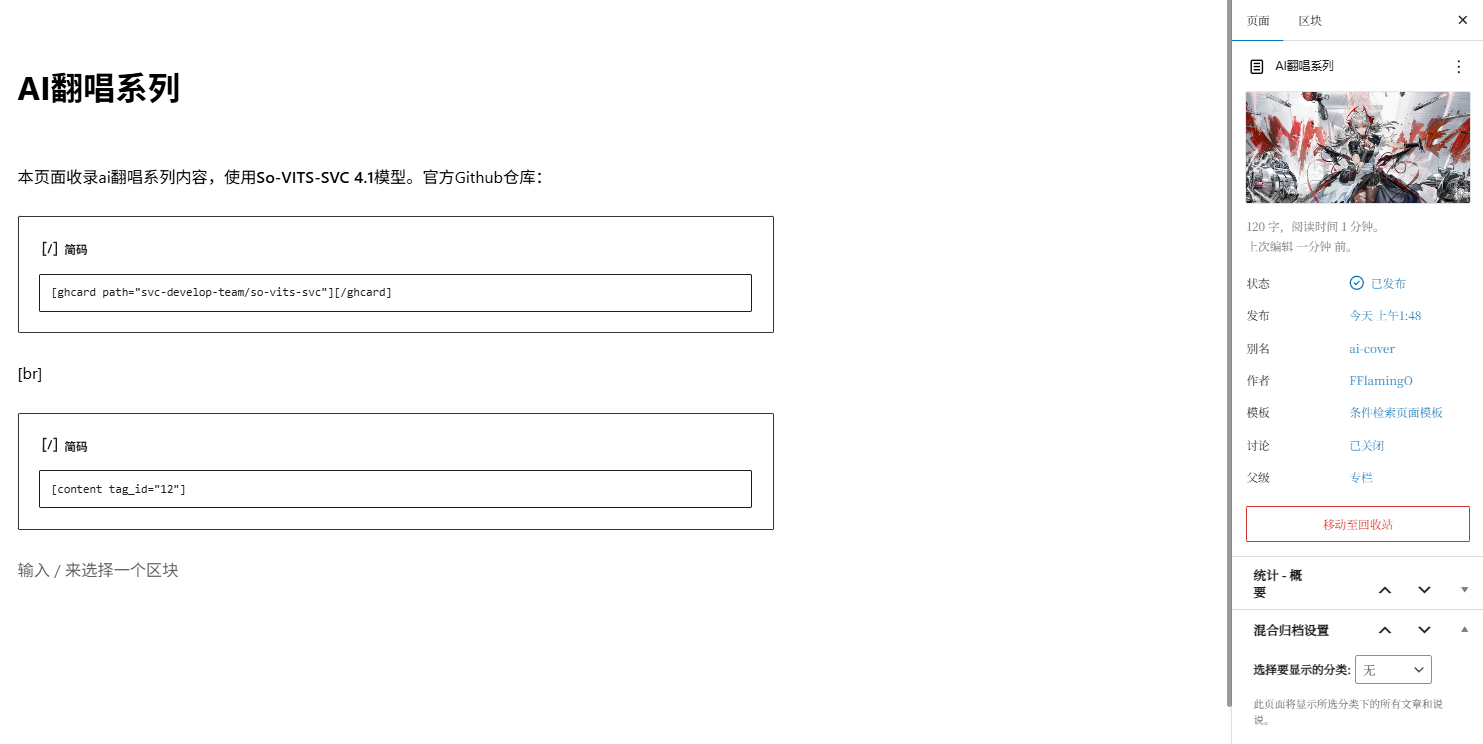


可以看到页面设置的标题、内容、特色图片均正常显示。
自定义选项快速定制分类
在使用 qwen.ai 的过程中,它给我提了一个很有趣的建议。虽然直接使用短代码可以平替,仍写在这里。
新建一个php页面模板:
<?php
/**
 * Template Name: 自定义混合归档页面
 * Description: 显示分类下所有文章和说说的混合归档页面
 */
get_header(); ?>

<div id="primary" class="content-area">
    <main id="main" class="site-main" role="main">

        <!-- 显示页面编辑器内容 -->
        <?php while (have_posts()) : the_post(); ?>
            <div class="page-content">
                <?php the_content(); ?>
            </div>
        <?php endwhile; ?>

        <!-- 获取当前页面关联的分类 -->
        <?php
        $category_slug = get_post_meta(get_the_ID(), '_custom_archive_category', true);

        if ($category_slug) :
            // 获取当前分类对象
            $category = get_category_by_slug($category_slug);
            if ($category) :
                // 显示分类标题和描述
                if (!iro_opt('patternimg') || !z_taxonomy_image_url()) { ?>
                    <header class="page-header">
                        <h1 class="cat-title"><?php echo $category->name; ?></h1>
                        <span class="cat-des"><?php echo $category->description; ?></span>
                    </header>
                <?php } ?>

                <!-- 使用短代码显示混合内容 -->
                <?php echo do_shortcode('[ai_content post_types="post,shuoshuo" category_name="' . $category_slug . '"]'); ?>

            <?php endif; ?>
        <?php else : ?>
            <p class="no-category-selected">请在页面设置中选择一个分类。</p>
        <?php endif; ?>
    </main>
</div>

<?php get_footer();
新建function
将以下代码添加到在 “Code Snippets” 中新建的php中,或直接添加到主题的function.php:
// 添加自定义混合归档页面选项
function add_custom_mixed_archive_meta_box() {
    add_meta_box(
        'custom_mixed_archive_settings',
        '混合归档设置',
        'custom_mixed_archive_meta_box_callback',
        'page',
        'side',
        'default'
    );
}
add_action('add_meta_boxes', 'add_custom_mixed_archive_meta_box');

function custom_mixed_archive_meta_box_callback($post) {
    // 添加安全验证字段
    wp_nonce_field('custom_mixed_archive_meta_box', 'custom_mixed_archive_meta_box_nonce');

    // 获取当前设置
    $category_slug = get_post_meta($post->ID, '_custom_archive_category', true);

    // 获取所有分类
    $categories = get_categories();
    ?>
    <p>
        <label for="custom_archive_category"><strong>选择要显示的分类:</strong></label>
        <select name="custom_archive_category" id="custom_archive_category">
            <option value="">无</option>
            <?php foreach ($categories as $category) : ?>
                <option value="<?php echo esc_attr($category->slug); ?>" <?php selected($category_slug, $category->slug); ?>>
                    <?php echo esc_html($category->name); ?>
                </option>
            <?php endforeach; ?>
        </select>
    </p>
    <p style="font-size: 0.9em; color: #666;">
        此页面将显示所选分类下的所有文章和说说。
    </p>
    <?php
}

// 保存设置
function save_custom_mixed_archive_meta_box($post_id) {
    // 验证nonce
    if (!isset($_POST['custom_mixed_archive_meta_box_nonce'])) {
        return;
    }

    // 验证nonce值
    if (!wp_verify_nonce($_POST['custom_mixed_archive_meta_box_nonce'], 'custom_mixed_archive_meta_box')) {
        return;
    }

    // 检查自动保存
    if (defined('DOING_AUTOSAVE') && DOING_AUTOSAVE) {
        return;
    }

    // 检查权限
    if (!current_user_can('edit_post', $post_id)) {
        return;
    }

    // 保存数据
    if (isset($_POST['custom_archive_category'])) {
        update_post_meta($post_id, '_custom_archive_category', sanitize_text_field($_POST['custom_archive_category']));
    }
}
add_action('save_post', 'save_custom_mixed_archive_meta_box');
保存后,在”添加页面“的右侧设置栏中会新增一个选项,选择分类并使用“自定义混合归档页面”模板后发布页面,该页面中即可显示指定分类的全部文章和说说。


原理:上述新增代码实际上是实现了为“自定义混合归档页面”模板创建的页面自动添加一行代码:
echo do_shortcode('[ai_content post_types="post,shuoshuo" category_name="' . $category_slug . '"]');利用实现的自定义条件检索短代码完成类型检索,只是在页面编辑过程中不用编写短代码而已,因此这个模板同样支持设置标题、正文和特色图片等,归档的文章会在页面内容之后展示。
虽然感觉用处不大就是了
Comments NOTHING